Paying down or closing a loan reduces your debt and improves the metrics that govern your flexibility inside the vault: LTV, health factor, and withdrawable collateral.
Why repay?
-
Lower LTV, higher health factor – each repayment moves your loan health toward green and raises the liquidation buffer.
-
Collateral freedom – collateral earmarked for the next redemption cycle is released proportionally, so you can withdraw it or redeploy it elsewhere.
-
Room for withdrawals – withdrawing collateral reduces your deposit and raises your LTV against the 90% LTV cap. Repaying first creates the headroom to pull principal out.
Making even a small repayment secures more control over how and when you use your collateral.
The Repay tab accepts three asset types: alAssets, MYT, or the underlying token. You can use whichever is most convenient or cheapest at the moment.
Earmarked vs non-earmarked debt
| Debt type | How to identify | Repayment asset | Effect |
|---|---|---|---|
| Non-earmarked | “Earmarked” counter = 0 in the UI | alAsset | Reduces debt immediately. |
| Earmarked | “Earmarked” shows a token amount | MYT | Repays the reserved slice and frees the earmarked collateral. |
Repaying earmarked debt before maturity can keep your health factor higher. MYT and underlying repayments settle earmarked debt first. If a position crosses the liquidation threshold, its earmarked debt is repaid from collateral first. Any wallet can repay a position, so someone else can also repay on your behalf.
Step 1 – Open the Repay tab
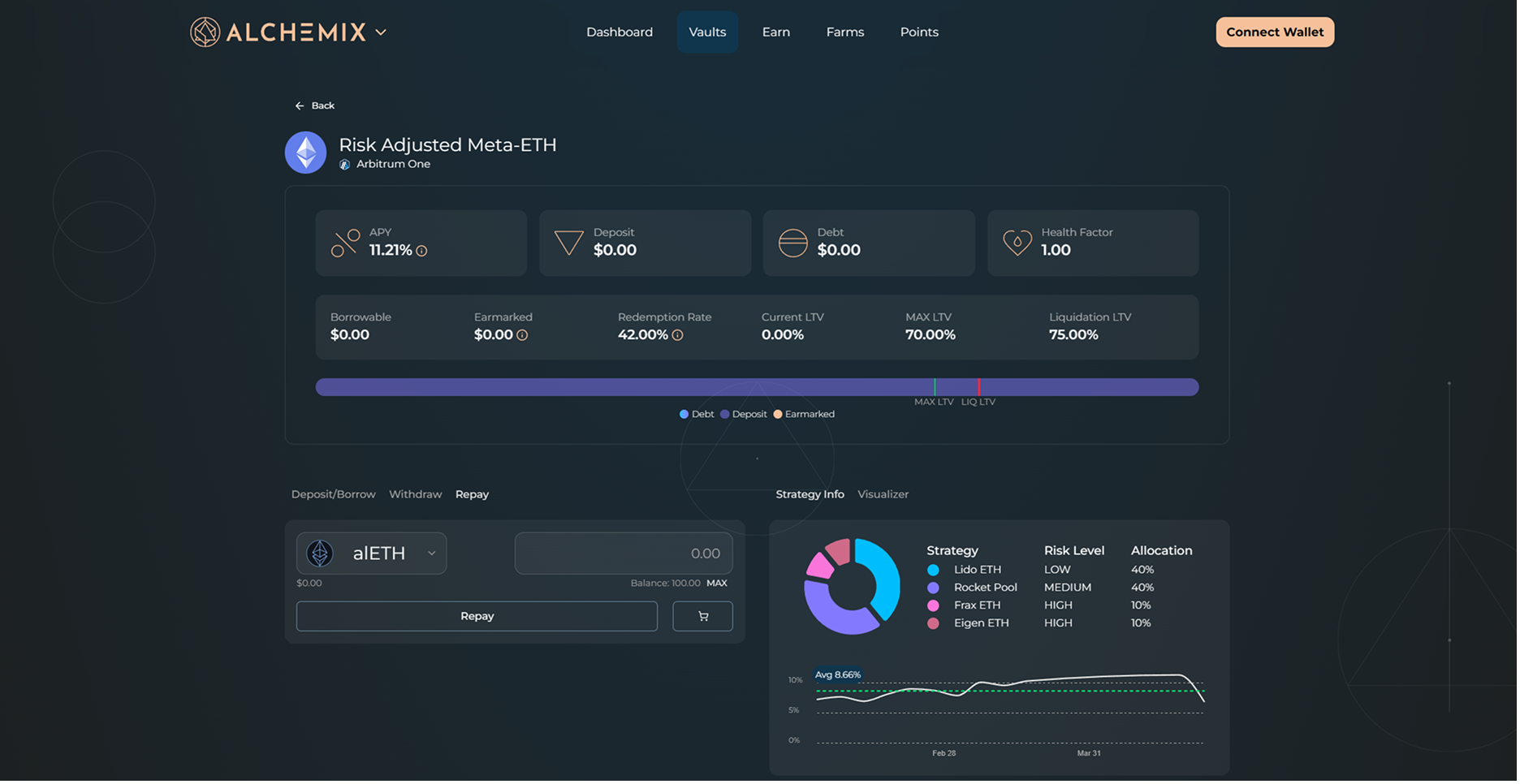
Go to the Dashboard, click Manage on your vault position, and select the Repay tab.
Step 2 – Choose what to repay with
| Option | When to use | Notes |
|---|---|---|
| alAsset (alUSD or alETH) | Standard debt | Repays non-earmarked debt only. |
| MYT (Mix-Yield Token) | Earmarked debt and/or standard debt | Required for any debt already earmarked for a redemption cycle. |
| Underlying (ETH or USDC) | Convenience | Interface swaps to MYT behind the scenes before applying the repayment. |
The asset-selector dropdown (left side of the entry box) lists the alAsset, the underlying asset, and MYT, plus ETH on WETH vaults. If all of your debt is earmarked, the panel says so, and only MYT or the underlying asset will clear it.
alUSD and alETH often trade a little under 1.00 on Curve. Buy them there and repay with them, and each unit bought below par still clears a full unit of debt. Flash Repay does the buying and repaying for you in one transaction.
Step 3 – Enter the amount
Type the number of tokens you want to use to repay debt. MAX will attempt to use your entire wallet balance, or the remainder of the debt balance, whichever is lower.
Step 4 – Send the transaction
Click Repay and confirm the transaction in your wallet.
Flash Repay
Flash Repay pays down your loan with alAssets bought on the market below 1.00. A flashloan funds the purchase, so an open position is all you need. It has its own entry box below the main Repay input.
How it works
The whole sequence runs in one transaction, routed through Enso:
- Flashloan the underlying asset (USDC or WETH) from Morpho.
- Swap it for the alAsset at the market rate.
- Burn the alAsset against your position, which clears the same amount of debt at 1:1.
- Withdraw collateral worth the debt that was cleared, as MYT.
- Redeem that MYT for the underlying asset.
- Repay the flashloan.
- Send what remains to your wallet.
Each alAsset clears a full unit of debt but cost less than 1.00, so the collateral withdrawn in step 4 is worth more than the flashloan. You receive the difference in the underlying asset. Click View transaction details in the confirmation window to see these steps with the quoted amounts.
Where your collateral goes
Flash Repay withdraws only as much collateral as the debt it clears, and all of it goes to repaying the flashloan. The rest stays in your position and keeps earning, so the confirmation window lists just the surplus, under Returned to Wallet. With your debt lower, more of that collateral is free to withdraw from the Withdraw tab.
If the swap buys more of the alAsset than your remaining debt, Flash Repay sends the extra alAsset to your wallet too.
Loan cost
On most lending platforms, a loan costs its borrow rate: the interest you pay while it is open. An Alchemix loan charges no interest. Its cost is the market discount you accepted if you sold the borrowed alAssets for less than 1.00. Redemptions settle your debt at 1:1, which locks that discount in as a cost. Repaying with alAssets bought below 1.00 settles debt for less than its face value and recovers part or all of it.
The confirmation window shows the numbers:
| Row | What it shows |
|---|---|
| Current Loan Cost | The discount on each of your borrows, priced from the alAsset’s market price when you borrowed. It assumes each borrow was sold at that price, and it includes debt that has since been cleared. |
| Flash Repay alAsset Price | How much of the underlying asset each alAsset costs at the quoted swap rate for your amount. |
| Flash Repay alAsset Target | The amount of debt you are clearing. |
| Recovered Loan Cost | The estimated surplus, after a 0.05% swap fee. |
| Loan Cost After Repay | Current Loan Cost minus Recovered Loan Cost. It turns green when the recovery is larger than the cost, meaning you were paid to take the loan. |
| Returned to Wallet | The estimated amount of the underlying asset sent to your wallet. It matches Recovered Loan Cost. |
The price and target rows name the vault’s alAsset, for example Flash Repay alUSD Price.
Example
Deposit 1,000 USDC, borrow 900 alUSD, and sell it at 0.97 for 873 USDC. Your loan cost is 27 USDC, or 3% of the debt.
Later, alUSD trades at 0.99 and none of your debt is earmarked. A Flash Repay of 900 alUSD:
- Flashloans about 891.45 USDC, which buys 900 alUSD after the 0.05% swap fee.
- Burns the 900 alUSD, which clears the full 900 alUSD of debt.
- Withdraws 900 USDC worth of collateral and repays the flashloan.
- Sends about 8.55 USDC to your wallet.
Your loan cost falls from 27 USDC to about 18.45 USDC, or 2.05% of the debt. That 2.05% is the total you paid to borrow, the Alchemix equivalent of the interest on a loan elsewhere, and it did not grow while the loan was open. The remaining 100 USDC of collateral, plus any yield it has earned, stays in the vault for you to withdraw.
If you time the repayment for when alUSD trades lower than it did when you borrowed, the recovery covers the whole loan cost and then some, so you were in effect paid to borrow. In the same example, a Flash Repay with alUSD at 0.96:
- Flashloans about 864.43 USDC to buy the 900 alUSD.
- Sends about 35.57 USDC to your wallet.
The 27 USDC loan cost becomes a gain of about 8.57 USDC, or 0.95% of the debt, and Loan Cost After Repay turns green.
These figures use example prices. The app quotes real ones before you confirm.
Limits
- Unearmarked debt only – Like any alAsset repayment, Flash Repay clears unearmarked debt. The most you can enter is your unearmarked debt, or the Global Burnable amount if that is lower. Repay earmarked debt with MYT or the underlying asset.
- Needs a discount – The surplus is the gap between the alAsset’s market price and 1.00. At 1.00 or above, there is no surplus to recover.
- Needs a swap route – If the market is too thin for your amount, the window shows “No swap route available at this size.” Try a smaller amount.
- Estimates can move – The quote allows up to 1% slippage, and the final surplus depends on the price when the transaction executes.
Transactions to sign
Only the position owner can withdraw collateral, so Enso moves your position NFT into your Enso wallet (a contract Enso sets up for your address) while the transaction runs and hands it back before the transaction ends. You approve this once.
- Wallets that support batched transactions sign once, with the approval and the repayment combined.
- Other wallets sign Approve Position Access and then Flash Repay alUSD (or alETH). The app skips the approval if it is already in place from an earlier attempt.
Flash Repay or self-liquidation
Both clear debt using your collateral. Self-liquidation, on the Liquidate tab, repays all of your debt from collateral at 1:1 and returns the remaining collateral, so it recovers none of your loan cost. Flash Repay clears unearmarked debt at the alAsset’s market price, pays you the difference, and leaves the rest of your collateral in the position.
Tips
-
If you plan to close a position entirely, repay any earmarked debt first (MYT) and then clear the remainder with your choice of asset.
-
Repaying earmarked debt with MYT can free up borrowable capacity sooner in a high redemption rate period.